Chapter 17. AI Agents Concepts, Architectures, and Use Cases
The evolution from static machine learning models to dynamic AI agents represents one of the most significant shifts in business analytics and automation. While traditional ML models provide predictions based on fixed inputs, AI agents can perceive their environment, reason about complex situations, take actions, and learn from outcomes—all with varying degrees of autonomy. This chapter explores the conceptual foundations of AI agents, their architectures, practical implementation platforms, and real-world business applications that are transforming how organizations operate in 2025 and beyond.
17.1 From Static Models to AI Agents
The Limitations of Static ML Models
Traditional machine learning models, while powerful, operate within strict boundaries:
- Fixed Input-Output Mapping: A credit scoring model takes specific features (income, credit history, debt-to-income ratio) and outputs a risk score. It cannot gather additional information, ask clarifying questions, or adapt its approach based on context.
- No Environmental Interaction: Models cannot access external systems, query databases, or call APIs to enrich their decision-making.
- Passive Operation: They wait for data to be provided rather than actively seeking information.
- Limited Adaptability: Once deployed, they require retraining and redeployment to incorporate new patterns or data.
Example: A fraud detection model flags suspicious transactions but cannot investigate further, contact the customer, freeze the account, or gather additional evidence. It simply outputs a probability score.
What Makes an AI Agent Different?
An AI agent is an autonomous system that:
- Perceives its environment through sensors, APIs, or data streams.
- Reasons about what actions to take using language models, logic, or learned policies.
- Acts by executing functions, calling APIs, or interacting with systems.
- Learns from feedback to improve future performance (in advanced implementations).
Key Characteristics:
- Autonomy: Can operate with minimal human intervention.
- Goal-Oriented: Works toward specific objectives (e.g., "resolve customer inquiry," "optimize inventory").
- Adaptive: Adjusts behavior based on context and feedback.
- Interactive: Engages with users, systems, and data sources dynamically.
Example: A customer service AI agent doesn't just classify support tickets—it reads the ticket, searches the knowledge base, retrieves the customer's order history, drafts a personalized response, and can escalate to a human if needed. It operates as an autonomous assistant rather than a passive classifier.
The Spectrum of Agent Autonomy
AI agents exist on a spectrum from fully supervised to fully autonomous :
|
Level |
Description |
Example |
|
Level 0: No Autonomy |
Human performs all tasks; AI provides suggestions |
Predictive model shows churn probability; human decides action |
|
Level 1: Assisted |
AI recommends actions; human approves |
Agent drafts email response; human reviews before sending |
|
Level 2: Conditional Autonomy |
AI acts independently within guardrails |
Agent handles routine inquiries; escalates complex cases |
|
Level 3: High Autonomy |
AI operates independently with periodic oversight |
Agent manages inventory orders; human reviews weekly |
|
Level 4: Full Autonomy |
AI operates completely independently |
Agent executes trades, manages supply chain end-to-end |
Most business AI agents in 2025 operate at Levels 1-3 , balancing efficiency with risk management.
17.2 Conceptual Architecture of AI Agents
Understanding the architecture of AI agents is essential for designing, implementing, and managing them effectively.
17.2.1 Perception, Reasoning, and Action Components
AI agents follow a Perception → Reasoning → Action cycle:
1. Perception Layer
Purpose: Gather information from the environment.
Components:
- Input Interfaces: Chat interfaces, email, voice, sensors, database queries, API calls.
- Data Preprocessing: Text parsing, image recognition, speech-to-text conversion.
- Context Retrieval: Accessing relevant historical data, user profiles, knowledge bases.
Example: A sales assistant agent receives an email inquiry, extracts key information (product interest, budget, timeline), and retrieves the customer's purchase history.
2. Reasoning Layer (The "Brain")
Purpose: Decide what action to take based on perceived information.
Components:
a) Large Language Models (LLMs):
- Serve as the core reasoning engine.
- Interpret natural language, understand context, generate responses.
- Examples: GPT-4, Claude, Gemini, Llama.
b) Memory Systems:
- Short-term Memory: Maintains context within a conversation or task session.
- Long-term Memory: Stores information across sessions (customer preferences, past interactions, learned patterns).
- Working Memory: Holds intermediate results during multi-step reasoning.
c) Planning and Decision-Making:
- Task Decomposition: Breaking complex goals into sub-tasks.
- Tool Selection: Choosing which tools or APIs to use.
- Chain-of-Thought Reasoning: Step-by-step logical reasoning to solve problems.
d) Knowledge Bases:
- Vector Databases: Store embeddings for semantic search (e.g., Pinecone, Weaviate, Chroma).
- Structured Databases: SQL/NoSQL databases for transactional data.
- Document Stores: Company policies, product manuals, FAQs.
Example: The sales agent reasons: "Customer asked about Product X pricing. I should check current pricing, available discounts, and their purchase history to provide a personalized quote."
3. Action Layer
Purpose: Execute decisions by interacting with systems and users.
Components:
- Tool Execution: Calling APIs, running database queries, triggering workflows.
- Response Generation: Crafting natural language responses, generating reports, creating visualizations.
- System Integration: Updating CRM records, sending emails, scheduling meetings, processing payments.
Example: The agent retrieves pricing from the product database, applies a loyalty discount, drafts a personalized email with the quote, and logs the interaction in the CRM.
17.2.2 Integration with Data, APIs, and Enterprise Systems (Conceptual)
AI agents don't operate in isolation—they must integrate seamlessly with existing business infrastructure.
Data Integration
Sources:
- Transactional Systems: ERP, CRM, e-commerce platforms.
- Operational Databases: Inventory, logistics, HR systems.
- External Data: Market data, weather, social media, third-party APIs.
Challenges:
- Data Silos: Information scattered across disconnected systems.
- Data Quality: Inconsistent formats, missing values, outdated records.
- Real-Time Access: Balancing speed with system load.
Solutions:
- Data Warehouses/Lakes: Centralized repositories (Snowflake, Databricks).
- APIs and Microservices: RESTful APIs, GraphQL for real-time access.
- ETL Pipelines: Extract, Transform, Load processes to prepare data.
API and Tool Integration
AI agents extend their capabilities by calling external tools and services:
Common Integrations:
- Communication: Email (Gmail, Outlook), messaging (Slack, Teams, WhatsApp), SMS.
- Productivity: Calendar (Google Calendar, Outlook), document management (Google Drive, SharePoint).
- Business Systems: CRM (Salesforce, HubSpot), ERP (SAP, Oracle), e-commerce (Shopify, WooCommerce).
- Specialized Tools: Payment processing (Stripe), shipping (FedEx API), analytics (Google Analytics).
Example Architecture:
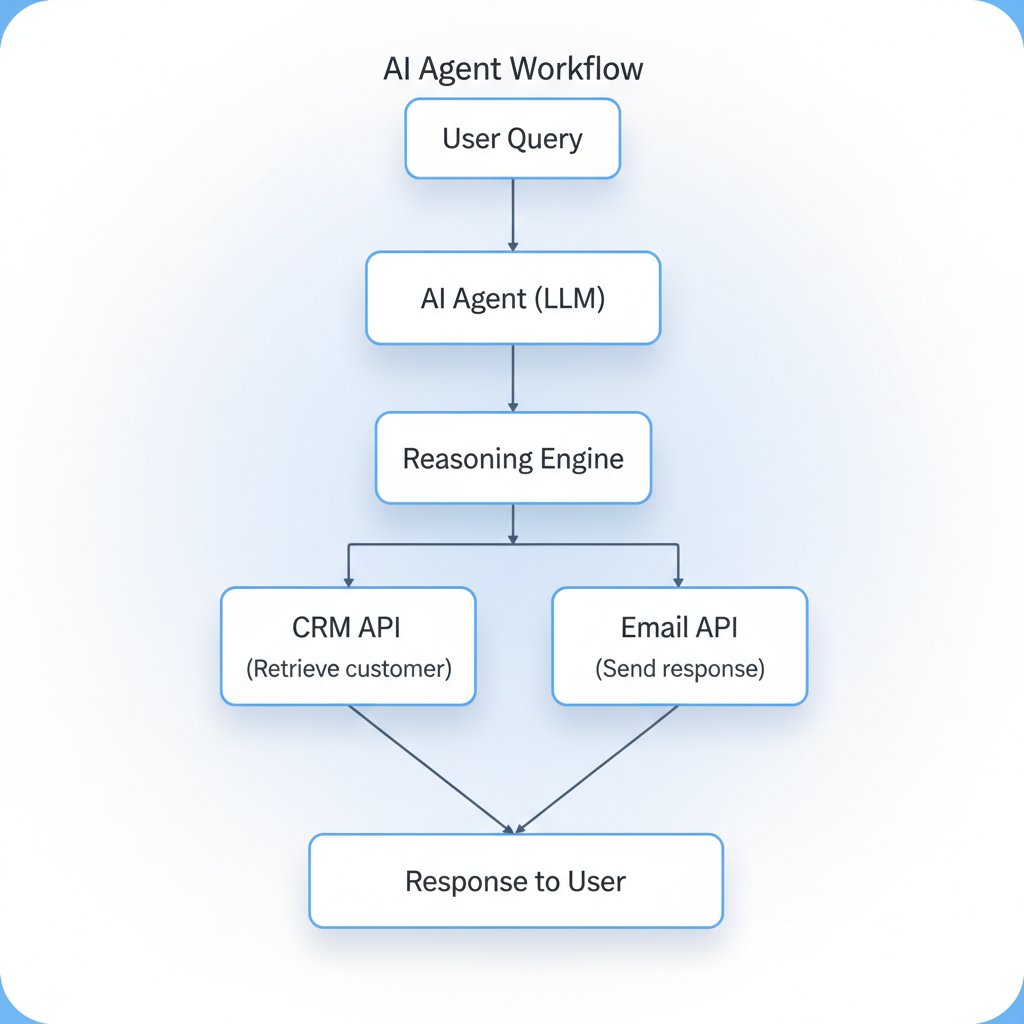
Enterprise System Integration Patterns
1. Direct API Integration:
- Agent calls APIs directly using authentication tokens.
- Pros: Fast, real-time.
- Cons: Requires managing credentials, rate limits, error handling.
2. Middleware/Integration Platforms:
- Use platforms like n8n , Zapier , Make , or Mulesoft to orchestrate integrations.
- Pros: Visual workflow design, pre-built connectors, easier maintenance.
- Cons: Additional layer of complexity, potential latency.
3. Event-Driven Architecture:
- Agent subscribes to events (e.g., "new order placed") and reacts accordingly.
- Pros: Scalable, decoupled systems.
- Cons: Requires event streaming infrastructure (Kafka, RabbitMQ).
17.3 Types of Business AI Agents
AI agents can be categorized by their primary function and domain of operation.
17.3.1 Customer Service and Sales Agents
Purpose: Automate customer interactions, support inquiries, and sales processes.
Customer Service Agents
Capabilities:
- Answer FAQs by searching knowledge bases.
- Troubleshoot issues using diagnostic workflows.
- Process returns, refunds, and account changes.
- Escalate complex cases to human agents.
Example: E-commerce Support Agent
Scenario: Customer contacts support about a delayed order.
Agent Workflow:
- Perceive: Receives customer message via chat.
- Reason: Identifies intent ("order status inquiry"), retrieves order details from database.
- Act: Checks shipping API for tracking info, provides update to customer.
- Follow-up: If delayed beyond threshold, offers discount code and apology.
Business Impact:
- 24/7 Availability: No downtime for customer support.
- Cost Reduction: Handles 60-80% of routine inquiries without human intervention.
- Faster Response Times: Instant replies vs. hours/days for human agents.
Real-World Example:
Klarna's AI assistant handled two-thirds of customer service chats in its first month (2024), equivalent to the work of 700 full-time agents, with customer satisfaction scores on par with human agents.
Sales Agents
Capabilities:
- Qualify leads by asking discovery questions.
- Provide product recommendations based on customer needs.
- Generate personalized quotes and proposals.
- Schedule demos and follow-up meetings.
- Nurture leads through email sequences.
Example: B2B Sales Assistant
Scenario: Prospect fills out a contact form on the company website.
Agent Workflow:
- Perceive: Receives form submission with company name, industry, and pain points.
- Reason: Enriches lead data using external APIs (company size, revenue, tech stack).
- Act: Sends personalized email with relevant case studies, schedules discovery call, logs lead in CRM.
- Follow-up: Monitors engagement (email opens, link clicks) and adjusts outreach strategy.
Business Impact:
- Lead Response Time: Instant vs. hours/days for human follow-up.
- Personalization at Scale: Tailored messaging for every lead.
- Higher Conversion Rates: Timely, relevant engagement increases pipeline velocity.
17.3.2 Operations and Supply Chain Agents
Purpose: Optimize operational processes, manage inventory, and coordinate logistics.
Inventory Management Agents
Capabilities:
- Monitor stock levels in real-time.
- Predict demand using historical data and external factors (seasonality, promotions, market trends).
- Automatically reorder products when inventory falls below thresholds.
- Optimize warehouse allocation and routing.
Example: Retail Inventory Agent
Scenario: A retail chain with 50 stores needs to optimize inventory across locations.
Agent Workflow:
- Perceive: Monitors sales data, current stock levels, supplier lead times, and upcoming promotions.
- Reason: Forecasts demand for each product at each location using ML models.
- Act: Generates purchase orders for suppliers, reallocates stock between stores to prevent stockouts/overstock.
- Learn: Adjusts forecasts based on actual sales vs. predictions.
Business Impact:
- Reduced Stockouts: Ensures products are available when customers want them.
- Lower Holding Costs: Minimizes excess inventory.
- Improved Cash Flow: Optimizes working capital tied up in inventory.
Supply Chain Coordination Agents
Capabilities:
- Track shipments across multiple carriers.
- Predict and mitigate delays (weather, port congestion, supplier issues).
- Coordinate with suppliers, manufacturers, and distributors.
- Optimize routing and logistics.
Example: Manufacturing Supply Chain Agent
Scenario: A manufacturer sources components from 20 suppliers across 5 countries.
Agent Workflow:
- Perceive: Monitors supplier production schedules, shipping status, customs clearance, and factory production plans.
- Reason: Identifies potential bottlenecks (e.g., supplier delay will cause production line stoppage in 3 days).
- Act: Alerts procurement team, suggests alternative suppliers, expedites shipping, adjusts production schedule.
- Communicate: Sends automated updates to stakeholders (suppliers, logistics partners, factory managers).
Business Impact:
- Reduced Downtime: Proactive issue resolution prevents production stoppages.
- Cost Savings: Optimized routing and carrier selection reduce shipping costs.
- Visibility: Real-time tracking across the entire supply chain.
17.3.3 Decision Support and Executive Assistant Agents
Purpose: Augment human decision-making with data-driven insights and automate executive tasks.
Decision Support Agents
Capabilities:
- Aggregate data from multiple sources (financial systems, market data, operational metrics).
- Generate reports, dashboards, and visualizations.
- Perform scenario analysis and sensitivity testing.
- Provide recommendations with supporting evidence.
Example: Financial Planning Agent
Scenario: CFO needs to evaluate the financial impact of opening a new distribution center.
Agent Workflow:
- Perceive: Gathers data on construction costs, operating expenses, projected revenue, market demand, competitor locations.
- Reason: Builds financial models (NPV, IRR, payback period), runs Monte Carlo simulations for risk analysis.
- Act: Generates executive summary with recommendations, visualizations, and sensitivity analysis.
- Interact: Answers follow-up questions ("What if construction costs increase by 20%?").
Business Impact:
- Faster Decision-Making: Hours instead of weeks for complex analysis.
- Data-Driven Insights: Reduces reliance on intuition alone.
- Scenario Exploration: Easily test multiple "what-if" scenarios.
Executive Assistant Agents
Capabilities:
- Manage calendars and schedule meetings.
- Prioritize emails and draft responses.
- Prepare briefing documents for meetings.
- Track action items and follow-ups.
- Conduct research and summarize findings.
Example: CEO Executive Assistant Agent
Scenario: CEO has 50+ emails daily, back-to-back meetings, and needs to prepare for board presentation.
Agent Workflow:
- Email Management: Categorizes emails by urgency/importance, drafts responses for routine inquiries, flags critical items.
- Calendar Optimization: Suggests meeting times based on priorities, blocks focus time, reschedules conflicts.
- Meeting Preparation: Pulls relevant data, creates briefing documents, summarizes key points from previous meetings.
- Research: Compiles competitive intelligence, market trends, and industry news relevant to upcoming decisions.
Business Impact:
- Time Savings: Frees up 5-10 hours per week for strategic work.
- Better Preparation: Ensures executives have relevant information before meetings.
- Reduced Cognitive Load: Handles routine tasks, allowing focus on high-value activities.
17.4 Designing Agent Workflows and Guardrails
Effective AI agents require careful workflow design and robust guardrails to ensure reliability, safety, and alignment with business objectives.
Workflow Design Principles
1. Define Clear Objectives and Success Criteria
Questions to Answer:
- What specific problem does the agent solve?
- What does success look like? (e.g., "resolve 70% of customer inquiries without escalation")
- What are the key performance indicators (KPIs)?
Example: Customer service agent objective: "Reduce average response time from 4 hours to 5 minutes while maintaining customer satisfaction score above 4.5/5."
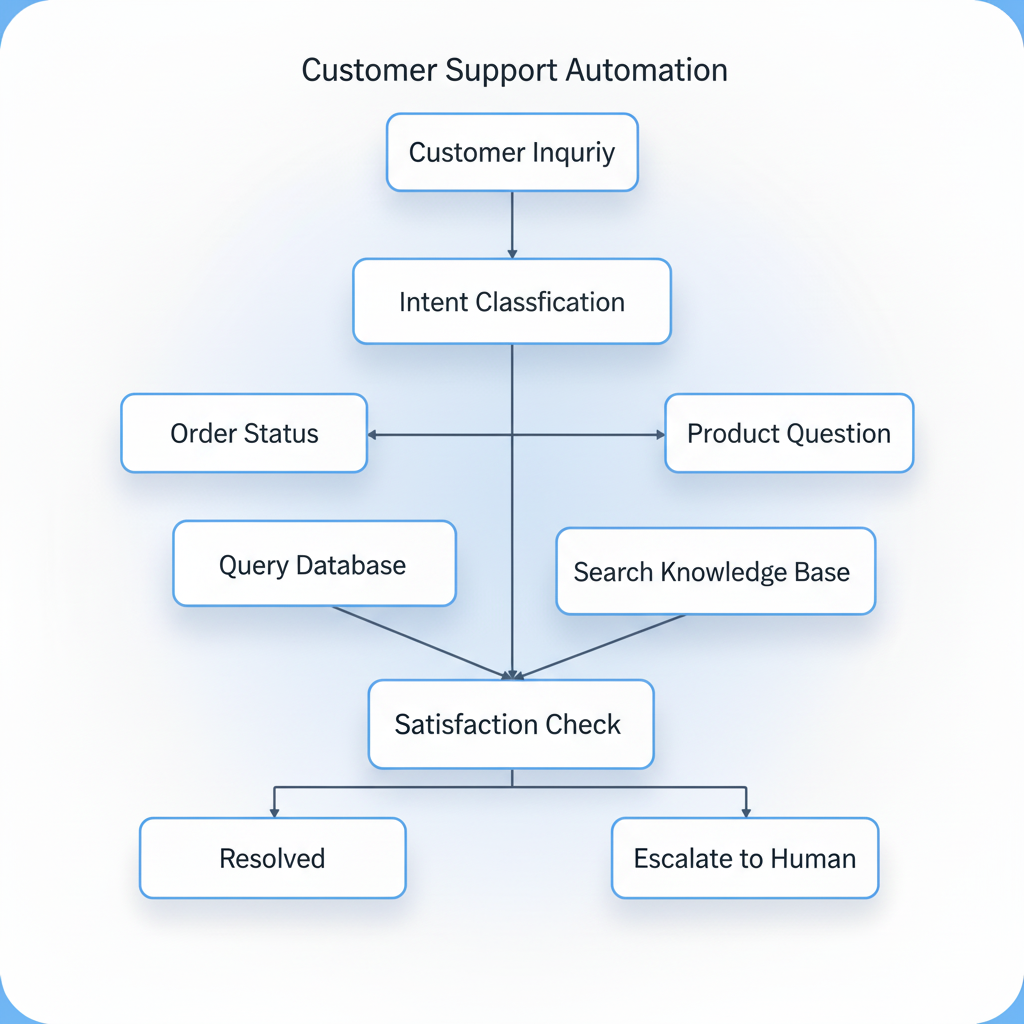
2. Map the Agent's Decision Tree
Visualize the agent's logic flow:
3. Identify Required Tools and Integrations
List all systems, APIs, and data sources the agent needs:
- Data Sources: CRM, order management system, knowledge base.
- Communication Channels: Email, chat, SMS.
- Actions: Update records, send notifications, create tickets.
4. Design for Failure and Edge Cases
Common Failure Modes:
- API timeouts or errors.
- Ambiguous user inputs.
- Missing or incomplete data.
- Unexpected user requests outside the agent's scope.
Mitigation Strategies:
- Graceful Degradation: Provide partial answers or fallback responses.
- Human Escalation: Clear criteria for when to hand off to humans.
- Error Logging: Track failures for continuous improvement.
Implementing Guardrails
Guardrails ensure agents operate safely, ethically, and within acceptable boundaries.
1. Input Validation and Sanitization
Purpose: Prevent malicious inputs, prompt injection attacks, or nonsensical queries.
Techniques:
- Input Filtering: Block profanity, personally identifiable information (PII), or suspicious patterns.
- Prompt Injection Detection: Identify attempts to manipulate the agent's behavior (e.g., "Ignore previous instructions and...").
- Rate Limiting: Prevent abuse by limiting requests per user/session.
2. Output Validation and Moderation
Purpose: Ensure agent responses are appropriate, accurate, and aligned with company policies.
Techniques:
- Content Filtering: Block harmful, biased, or inappropriate content.
- Fact-Checking: Verify claims against trusted sources before presenting to users.
- Tone and Style Enforcement: Ensure responses match brand voice and professionalism.
Example: A customer service agent should never promise refunds beyond company policy, even if the LLM generates such a response.
3. Action Constraints and Approval Workflows
Purpose: Limit the agent's ability to take high-risk actions without oversight.
Levels of Constraint:
|
Risk Level |
Action Type |
Guardrail |
|
Low |
Answer FAQ, provide information |
Fully autonomous |
|
Medium |
Update customer record, send email |
Autonomous with logging |
|
High |
Issue refund, change pricing |
Requires human approval |
|
Critical |
Execute financial transaction, delete data |
Blocked or multi-level approval |
Example: An inventory agent can automatically reorder products under $10,000 but requires manager approval for orders above that threshold.
4. Monitoring and Auditing
Purpose: Track agent behavior, detect anomalies, and ensure compliance.
Key Metrics:
- Task Success Rate: Percentage of tasks completed successfully.
- Escalation Rate: How often the agent hands off to humans.
- Error Rate: Frequency of failures or incorrect responses.
- User Satisfaction: Feedback scores, complaint rates.
- Compliance Violations: Instances of policy breaches or inappropriate actions.
Tools:
- Logging Systems: Capture all agent interactions, decisions, and actions.
- Dashboards: Real-time monitoring of agent performance.
- Alerts: Notify administrators of anomalies or critical errors.
5. Ethical and Legal Guardrails
Considerations:
- Bias and Fairness: Ensure agents don't discriminate based on protected characteristics.
- Privacy: Comply with GDPR, CCPA, and other data protection regulations.
- Transparency: Disclose when users are interacting with an AI agent vs. a human.
- Accountability: Establish clear responsibility for agent actions.
Example: A hiring assistant agent must be audited to ensure it doesn't exhibit gender, racial, or age bias in candidate screening.
17.5 Practical Implementation Considerations
Implementing AI agents in production requires addressing technical, organizational, and operational challenges.
Choosing the Right Platform
The landscape of AI agent platforms has evolved rapidly. Two notable platforms that have gained traction in 2025 are n8n and Manus AI .
n8n: Workflow Automation with AI Integration
Overview:
n8n is an open-source workflow automation platform that enables users to build AI-powered workflows through a visual, node-based interface. It has emerged as a dominant player in the low-code AI automation space, capturing approximately 90% of platform mentions in automation content by late 2025.
Key Features:
- Visual Workflow Builder: Drag-and-drop interface for designing automation workflows.
- 400+ Integrations: Pre-built connectors for popular services (Gmail, Slack, Salesforce, Google Sheets, databases, etc.).
- AI-Specific Nodes: Direct integration with OpenAI, Azure OpenAI, and other LLM providers.
- LangChain Integration: Built-in support for building AI agents with tools, memory, and reasoning capabilities.
- Self-Hosted or Cloud: Deploy on your own infrastructure or use n8n's cloud service.
- Custom Code Execution: JavaScript and Python nodes for advanced logic.
Agent Architecture in n8n:
n8n provides two primary agent types:
- Tools Agent: Allows LLMs to use predefined tools (web search, calculations, API calls) to accomplish tasks.
- Conversational Agent: Facilitates multi-turn conversations with memory within a single workflow execution.
Example Workflow: AI-Powered Telegram Assistant
This real-world implementation demonstrates n8n's capabilities:
- Trigger: Receives messages from Telegram.
- Voice Processing: Converts voice messages to text using OpenAI Whisper.
- Image Analysis: Analyzes images using AI vision models.
- Memory: Stores conversation history in PostgreSQL for context retention.
- Actions: Manages emails, calendar events, and tasks through natural language commands.
- Response: Sends replies in both text and voice formats.
Strengths:
- Ease of Use: Visual interface lowers the barrier to entry for non-developers.
- Flexibility: Open-source nature allows unlimited customization.
- Cost-Effective: Free self-hosted option; cloud plans start at €24/month.
- Active Community: 55,000+ developers contribute templates and plugins.
Limitations:
- Stateless Design: Agents lose context after workflow execution ends unless external databases are used for memory.
- No Autonomous Planning: Requires manual prompt engineering and fixed branching logic; cannot independently break down complex goals.
- Scalability Challenges: Performance issues with complex, multi-step reasoning chains and token limits.
- Error Handling: Rule-based error handling can lead to incomplete executions in complex workflows.
Best Use Cases:
- Structured, single-task automations (email classification, document summarization, basic chatbots).
- Prototyping and proof-of-concept projects.
- Small to medium-scale deployments where simplicity is prioritized over advanced autonomy.
When to Avoid:
- Scenarios requiring persistent memory across sessions without external database setup.
- Complex, multi-agent systems with autonomous planning and decision-making.
- High-stakes applications demanding robust error recovery and reliability.
Manus AI: Autonomous Task Execution
Overview:
Manus AI , introduced in early 2025 by Chinese startup Monica.im, represents a breakthrough in autonomous AI agents. It bridges the gap between "mind" (reasoning) and "hand" (execution) by combining multiple LLMs and enabling agents to perform complex tasks with minimal human intervention.
Key Features:
- Multi-Model Dynamic Invocation: Seamlessly switches between GPT-4, Claude 3, and Gemini based on task requirements.
- Autonomous Task Execution: Creates apps, websites, and workflows from natural language prompts.
- Multi-Agent Parallelism: Orchestrates multiple specialized agents (Idea Agent, Validation Agent, etc.) for enterprise-level operations.
- Self-Verification: Agents validate their own outputs and correct errors autonomously.
- Cloud Async Processing: Handles 1,000+ concurrent tasks with distributed computing.
- Browser/IDE Plugins: Enables cross-platform control and integration.
Example Use Case: Automated Web Application Development
Scenario: User provides a prompt: "Build a customer feedback dashboard with sentiment analysis."
Manus Workflow:
- Planning Agent: Breaks down the task into sub-tasks (design UI, set up database, implement sentiment analysis, deploy).
- Execution Agents: Multiple agents work in parallel—one designs the UI, another sets up the backend, another integrates sentiment analysis APIs.
- Validation Agent: Tests the application, identifies bugs, and triggers corrections.
- Deployment Agent: Deploys the application to a cloud platform.
Strengths:
- High Autonomy: Capable of end-to-end task execution with minimal human input.
- Flexibility: Adapts to dynamic requirements and edits workflows mid-execution.
- Scalability: Cloud-based architecture supports large-scale, concurrent operations.
- Advanced AI Features: Multi-agent orchestration, self-correction, and adaptive reasoning.
Limitations:
- Steep Learning Curve: Requires Python/API knowledge for advanced configurations.
- Custom Pricing: No transparent pricing; requires custom quotes.
- Less Mature Ecosystem: Newer platform with smaller community compared to n8n.
Best Use Cases:
- Complex, multi-step projects requiring autonomous planning and execution.
- Enterprise-level automation with high concurrency demands.
- Scenarios where agents need to adapt dynamically to changing requirements.
When to Avoid:
- Simple, straightforward automations where n8n's visual interface is more efficient.
- Budget-constrained projects (pricing may be higher than alternatives).
- Teams without technical expertise to configure and manage advanced agent systems.
Platform Comparison: n8n vs. Manus AI
|
Criterion |
n8n |
Manus AI |
|
Usability |
Visual, drag-and-drop (5/5) |
Requires coding knowledge (3/5) |
|
Autonomy |
Limited; manual workflows (2/5) |
High; autonomous task execution (5/5) |
|
Flexibility |
Self-hosted or cloud; 400+ integrations (4/5) |
Multi-model, cross-platform (5/5) |
|
Pricing |
Free (self-hosted) or €24/month (cloud) |
Custom quotes; higher cost (3/5) |
|
Scalability |
Struggles with complex workflows (3/5) |
Handles 1,000+ concurrent tasks (5/5) |
|
AI Features |
Basic agent nodes, LangChain integration (3/5) |
Multi-agent orchestration, self-verification (5/5) |
|
Community |
55,000+ developers, extensive templates (5/5) |
Emerging community (3/5) |
|
Best For |
Prototyping, simple automations, SMBs |
Complex projects, enterprise automation |
Other Notable Platforms
- Make (formerly Integromat): No-code leader with 6,000+ integrations; best for non-technical users but limited customization.
- Zapier: Popular for simple automations; expensive for high-volume workflows.
- Microsoft Copilot Studio: Tightly integrated with Microsoft ecosystem; ideal for enterprises using Office 365/Dynamics 365.
- LangChain/LangGraph: Developer-focused frameworks for building custom agents with full code control.
Personal Use Cases for AI Agents
AI agents aren't just for businesses—individuals can leverage them to boost productivity and automate personal tasks.
1. Personal Finance Manager
Capabilities:
- Track expenses across bank accounts and credit cards.
- Categorize spending and identify trends.
- Alert when budgets are exceeded.
- Suggest savings opportunities.
- Automate bill payments and investment contributions.
Implementation (n8n):
- Trigger: Daily schedule or new transaction notification.
- Data Source: Connect to bank APIs (Plaid, Yodlee) or parse email receipts.
- Processing: Categorize transactions using LLM, calculate totals.
- Action: Update Google Sheets budget tracker, send weekly summary email.
2. Personal Research Assistant
Capabilities:
- Monitor news, research papers, and industry blogs on topics of interest.
- Summarize articles and extract key insights.
- Organize findings in a knowledge base (Notion, Obsidian).
- Answer questions based on accumulated knowledge.
Implementation (n8n + LLM):
- Trigger: RSS feeds, Google Alerts, or scheduled web scraping.
- Processing: LLM summarizes articles, extracts key points.
- Storage: Save summaries to Notion or Airtable with tags.
- Query: Conversational agent retrieves relevant summaries on demand.
3. Health and Fitness Coach
Capabilities:
- Track workouts, meals, and sleep.
- Provide personalized workout plans and nutrition advice.
- Send reminders and motivational messages.
- Analyze trends and suggest adjustments.
Implementation (n8n + Wearable APIs):
- Data Source: Fitbit, Apple Health, MyFitnessPal APIs.
- Processing: LLM analyzes data, identifies patterns (e.g., "sleep quality drops after late workouts").
- Action: Send daily coaching messages via SMS or Telegram.
4. Smart Home Automation Agent
Capabilities:
- Control lights, thermostat, security cameras based on routines and preferences.
- Respond to voice commands for complex scenarios (e.g., "movie mode" dims lights, closes blinds, turns on TV).
- Learn patterns and proactively adjust settings (e.g., pre-heat home before arrival).
Implementation (n8n + Home Assistant):
- Trigger: Voice command (Alexa, Google Assistant), time-based, or sensor-based.
- Reasoning: LLM interprets natural language commands, determines actions.
- Action: Call Home Assistant APIs to control devices.
Company Use Cases for AI Agents
1. HR Onboarding Agent
Capabilities:
- Guide new hires through onboarding process.
- Collect documents (tax forms, contracts).
- Provision accounts (email, Slack, software licenses).
- Schedule orientation meetings.
- Answer common HR questions.
Implementation (n8n):
- Trigger: New hire added to HRIS.
- Workflow: Send welcome email with onboarding checklist, create accounts via APIs (Google Workspace, Slack), schedule meetings (Google Calendar), assign training modules (LMS).
- Chatbot: Conversational agent answers questions about benefits, policies, etc.
Business Impact:
- Time Savings: Reduces HR admin time by 10-15 hours per new hire.
- Consistency: Ensures every new hire receives the same high-quality experience.
- Faster Ramp-Up: New hires become productive sooner.
2. Marketing Content Generation Agent
Capabilities:
- Generate blog posts, social media content, email campaigns.
- Optimize content for SEO.
- Personalize messaging for different audience segments.
- Schedule and publish content across channels.
Implementation (Manus AI or n8n + LLM):
- Input: Content brief (topic, keywords, target audience).
- Processing: LLM generates draft, optimizes for SEO, creates variations for different channels.
- Review: Human editor reviews and approves.
- Action: Publish to WordPress, schedule social posts (Buffer, Hootsuite), send email campaign (Mailchimp).
Business Impact:
- Increased Output: 3-5x more content produced with same team size.
- Consistency: Maintains brand voice across all content.
- Personalization: Tailored messaging improves engagement rates.
3. IT Support Agent
Capabilities:
- Troubleshoot common technical issues (password resets, software installation, network problems).
- Provide step-by-step guidance.
- Escalate complex issues to IT team with detailed context.
- Track and resolve tickets.
Implementation (n8n + Knowledge Base):
- Trigger: User submits ticket via chat or email.
- Reasoning: LLM searches knowledge base for solutions, asks clarifying questions.
- Action: Provides troubleshooting steps, resets passwords via API, creates ticket in Jira if escalation needed.
Business Impact:
- Reduced Ticket Volume: Resolves 40-60% of tickets autonomously.
- Faster Resolution: Instant responses vs. hours/days for human support.
- Cost Savings: Reduces need for large IT support teams.
4. Sales Pipeline Management Agent
Capabilities:
- Monitor sales pipeline and identify at-risk deals.
- Suggest next best actions for each opportunity.
- Automate follow-ups and reminders.
- Generate sales forecasts.
Implementation (n8n + CRM):
- Data Source: Salesforce, HubSpot CRM.
- Processing: LLM analyzes deal stage, last activity, customer engagement, historical win rates.
- Action: Send reminders to sales reps, suggest personalized outreach, update forecasts in CRM.
Business Impact:
- Higher Win Rates: Proactive engagement prevents deals from stalling.
- Better Forecasting: Data-driven predictions improve planning.
- Sales Rep Productivity: Automates administrative tasks, allowing focus on selling.
17.6 Measuring the Performance and ROI of AI Agents
Deploying AI agents is an investment—measuring their performance and return on investment (ROI) is essential for justifying costs and guiding improvements.
Key Performance Indicators (KPIs)
1. Task Success Rate
Definition: Percentage of tasks the agent completes successfully without human intervention.
Formula:
Task Success Rate = Tasks Completed Successfully / Total Tasks Attempted ×100%
Target: 70-90% for most business applications.
Example: Customer service agent resolves 850 out of 1,000 inquiries autonomously → 85% success rate.
2. Escalation Rate
Definition: Percentage of tasks that require human intervention.
Formula:
Escalation Rate = Tasks Escalated to Humans / Total Tasks Attempted×100%
Target: 10-30% depending on complexity.
Interpretation: Lower is better, but some escalation is expected for complex or sensitive cases.
3. Response Time
Definition: Average time from user request to agent response.
Target: < 5 seconds for simple queries, < 30 seconds for complex tasks.
Example: Traditional email support: 4 hours average response time. AI agent: 10 seconds.
4. User Satisfaction Score
Definition: Feedback from users on their experience with the agent.
Measurement: Post-interaction surveys (e.g., "How satisfied were you with this interaction?" 1-5 scale).
Target: ≥ 4.0/5.0.
Benchmark: Should be comparable to or better than human agent satisfaction scores.
5. Cost per Interaction
Definition: Total cost of operating the agent divided by number of interactions.
Formula:
Cost per Interaction = Number of InteractionsTotal * Agent Operating Costs
Components:
- Platform/infrastructure costs.
- LLM API costs (token usage).
- Development and maintenance costs (amortized).
Comparison: Compare to cost of human-handled interactions.
Example:
- Human agent: $5-$10 per interaction (salary, benefits, overhead).
- AI agent: $0.10-$0.50 per interaction.
6. Error Rate
Definition: Percentage of agent responses that are incorrect, inappropriate, or violate policies.
Target: < 5%.
Monitoring: Regular audits of agent interactions, user feedback, escalation reasons.
Calculating ROI
ROI Formula:
ROI=Total InvestmentNet Benefit×100%
Where:
- Net Benefit = (Cost Savings + Revenue Gains) - Operating Costs
- Total Investment = Development Costs + Infrastructure Costs + Training Costs
Example: Customer Service Agent ROI
Scenario: E-commerce company deploys AI agent to handle customer inquiries.
Baseline (Before Agent):
- 10,000 inquiries/month.
- Human agents handle all inquiries at $8/interaction.
- Total monthly cost: $80,000.
After Agent Deployment:
- Agent handles 7,000 inquiries (70% success rate).
- Humans handle 3,000 inquiries.
- Agent cost: $0.30/interaction × 7,000 = $2,100.
- Human cost: $8/interaction × 3,000 = $24,000.
- Total monthly cost: $26,100.
Monthly Savings: $80,000 - $26,100 = $53,900.
Annual Savings: $53,900 × 12 = $646,800.
Investment:
- Development: $50,000 (one-time).
- Infrastructure: $500/month = $6,000/year.
- Maintenance: $10,000/year.
- Total first-year investment: $66,000.
First-Year ROI:
ROI = 66,0006 / (46,800−66,000) × 100% = 880%
Payback Period: ~1.2 months.
Beyond Cost Savings: Strategic Value
While cost savings are tangible, AI agents also deliver strategic benefits:
- Scalability: Handle 10x or 100x more interactions without proportional cost increases.
- 24/7 Availability: Serve global customers across time zones.
- Consistency: Eliminate variability in service quality.
- Data Insights: Capture structured data on customer needs, pain points, and trends.
- Employee Satisfaction: Free human agents from repetitive tasks, allowing focus on complex, rewarding work.
Exercises
Exercise 1: Map Out an Architecture Diagram for an AI Agent Supporting a Specific Process
Scenario: Design an AI agent to support order tracking for an e-commerce company.
Tasks:
- Define the Agent's Objective: What problem does it solve? What are the success criteria?
- Identify Inputs: What information does the agent receive? (e.g., customer inquiry via chat, order number, customer ID)
- Map the Perception Layer: What data sources does the agent access? (e.g., order management system, shipping API, customer database)
- Design the Reasoning Layer: What decisions does the agent make? (e.g., determine order status, identify delays, suggest actions)
- Specify the Action Layer: What actions does the agent take? (e.g., provide tracking update, send notification, escalate to human)
- Create an Architecture Diagram: Use a tool like Lucidchart, draw.io, or pen and paper to visualize the agent's components and data flows.
- Identify Required Integrations: List all APIs, databases, and systems the agent needs to connect to.
Deliverable: Architecture diagram with annotations explaining each component and data flow.
Exercise 2: Define KPIs and Success Criteria for a Customer Service AI Agent
Scenario: Your company is deploying an AI agent to handle customer support inquiries for a SaaS product.
Tasks:
- Define Business Objectives: What are the primary goals? (e.g., reduce response time, lower support costs, improve customer satisfaction)
- Identify Key Performance Indicators (KPIs): For each objective, define 2-3 measurable KPIs. Examples:
- Response Time: Average time from inquiry to first response.
- Resolution Rate: Percentage of inquiries resolved without human escalation.
- Customer Satisfaction Score (CSAT): Post-interaction survey rating.
- Cost per Interaction: Total agent operating cost divided by number of interactions.
- Set Targets: For each KPI, define a target value (e.g., "Response time < 30 seconds," "Resolution rate > 75%").
- Establish Baseline Metrics: If available, document current performance (before agent deployment) for comparison.
- Define Success Criteria: What thresholds must the agent meet to be considered successful? (e.g., "Agent must achieve 80% resolution rate and CSAT ≥ 4.2/5 within 3 months")
- Plan Monitoring and Reporting: How will you track these KPIs? (e.g., dashboards, weekly reports, automated alerts)
Deliverable: A KPI framework document (1-2 pages) with objectives, KPIs, targets, and monitoring plan.
Exercise 3: Evaluate the Risks and Safeguards Needed for an Agent That Can Take Financial Actions
Scenario: Your company is considering deploying an AI agent that can approve refunds up to $500 for customer service cases.
Tasks:
-
Identify Risks:
Brainstorm potential risks associated with this agent. Examples:
- Fraud: Customers exploiting the agent to obtain undeserved refunds.
- Policy Violations: Agent approving refunds outside company policy.
- Financial Loss: Excessive refunds impacting profitability.
- Reputational Damage: Inconsistent or unfair refund decisions.
- Compliance Issues: Violating consumer protection laws or payment regulations.
-
Assess Risk Severity:
For each risk, rate the likelihood (Low/Medium/High) and impact (Low/Medium/High).
-
Design Safeguards:
For each high-priority risk, propose specific safeguards. Examples:
- Fraud Detection: Implement anomaly detection to flag suspicious patterns (e.g., same customer requesting multiple refunds).
- Policy Enforcement: Hard-code policy rules (e.g., "No refunds for purchases older than 30 days").
- Approval Thresholds: Require human approval for refunds above $200 or for customers with prior refund history.
- Audit Logging: Log all refund decisions with reasoning for post-hoc review.
- Rate Limiting: Limit refunds per customer per time period.
-
Define Escalation Criteria:
When should the agent escalate to a human? (e.g., refund amount > $200, customer disputes agent decision, policy ambiguity)
-
Plan Monitoring and Auditing:
How will you monitor the agent's refund decisions? (e.g., daily reports, random audits, anomaly alerts)
-
Consider Ethical and Legal Implications:
Are there fairness concerns? (e.g., does the agent treat all customers equally?) Are there legal requirements? (e.g., consumer protection laws, data privacy)
Deliverable: A risk assessment and safeguard plan (2-3 pages) with risk matrix, safeguard descriptions, and monitoring plan.
Exercise 4: Propose a Phased Rollout Plan for Introducing AI Agents in an Organization
Scenario: Your organization wants to introduce AI agents to automate customer support, but leadership is cautious about risks and wants a gradual rollout.
Tasks:
-
Define Rollout Phases:
Propose a 3-5 phase plan for introducing the agent. Example phases:
- Phase 1: Pilot (Internal Testing) – Deploy agent to internal team for testing and feedback.
- Phase 2: Limited Beta – Deploy to 10% of customers for low-risk inquiries (e.g., FAQs, order tracking).
- Phase 3: Expanded Beta – Increase to 50% of customers, expand to medium-complexity inquiries.
- Phase 4: Full Rollout – Deploy to all customers for all inquiry types (with human escalation).
- Phase 5: Optimization – Continuous improvement based on performance data.
-
Define Success Criteria for Each Phase:
What must be achieved before moving to the next phase? (e.g., "Phase 1: Agent resolves 70% of test inquiries with CSAT ≥ 4.0")
-
Identify Risks and Mitigation Strategies for Each Phase:
What could go wrong? How will you mitigate? (e.g., "Phase 2 risk: Negative customer feedback. Mitigation: Provide easy escalation to human, monitor feedback closely")
-
Estimate Timeline and Resources:
How long will each phase take? What resources are needed? (e.g., "Phase 1: 4 weeks, 2 developers, 1 product manager")
-
Plan Communication and Change Management:
How will you communicate the rollout to customers and employees? (e.g., "Announce agent in FAQ, provide training to support team, gather feedback via surveys")
-
Define Rollback Criteria:
Under what conditions would you pause or roll back the deployment? (e.g., "If CSAT drops below 3.5 or error rate exceeds 10%, pause rollout and investigate")
Deliverable: A phased rollout plan (2-3 pages) with timeline, success criteria, risks, and communication strategy.
Chapter Summary
AI agents represent a paradigm shift from static models to dynamic, autonomous systems that perceive, reason, and act. This chapter explored the conceptual architecture of AI agents (perception, reasoning, action), practical implementation platforms like n8n (for visual, workflow-based automation) and Manus AI (for autonomous, multi-agent systems), and real-world use cases across customer service, operations, and decision support. We examined workflow design principles, guardrails for safe and ethical operation, and methods for measuring performance and ROI. Through practical exercises, you've mapped agent architectures, defined KPIs, evaluated risks, and designed rollout plans—equipping you with the knowledge to design, implement, and manage AI agents that deliver measurable business value. As AI agents continue to evolve, the organizations that master their deployment will gain significant competitive advantages in efficiency, scalability, and customer experience.